


Here is a minimalist, quick and easy tutorial on disk cloning using Linux.
Clone a whole disk on Linux.
Goal of the tutorial :clone a 1:1 perfect copy of a disk, including boot sectors.
Example use case : upgrade to a SSD without reinstalling your operating system.
Level : advanced.

Warning : your target disk must be of equal or higher capacity than your source disk.
Solution : Linux "dd" command
Step 1 : connect your disks, using SATA or USB, to your computer.
Like this :

Step 2 : launch a Linux live environment.
No matter which one : Clonezilla Live, Ubuntu, Mint, Gparted Live
Why ? Your disks must not be in use during cloning.
Step 3 : List your volumes
- CTRL + ALT + T (open a Terminal)
lsblk
Note down your disks names : most likely something like /dev/sda and /dev/sdb
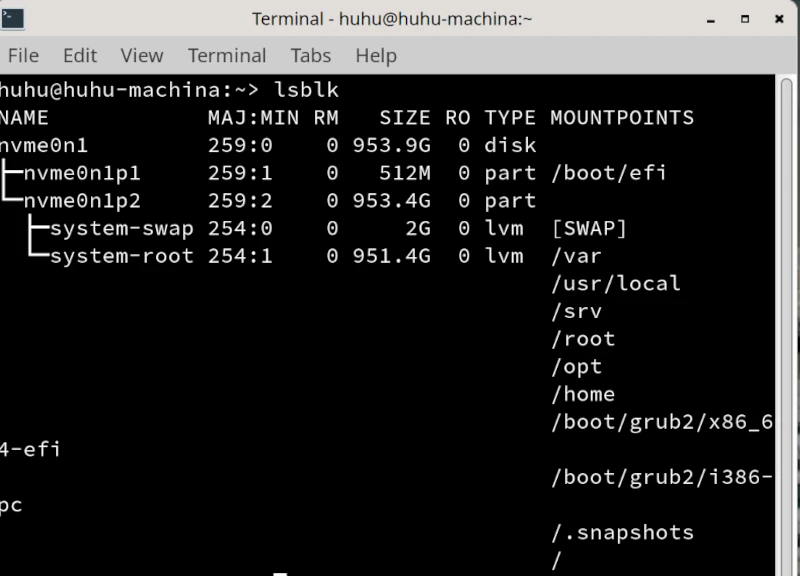
Here there only one disk : /dev/nvme01n
Worried about making a mistake or losing your data?
Igor Web handles this procedure safely for individuals and businesses: remotely, at our workshop in Pouligny-Notre-Dame (36), by mail-in, or on-site across departments 36, 23, 18, and 03.
Step 4 : cloning
dd if=/dev/sda of=/dev/sdb bs=4M status=progress
- dd : clone the disk
- if= : source disk
- of= : target disk
- bs=4M : block size (size of used blocks) 4M
- status=progress : shows cloning progress
Step 5 : wait
dd creates a perfect clone, block by block, even empty spaces, so grab a drink, as it can last longer than 24 hours.
Step 6 : put disks back in place.
Once dd is finished, quit the live environment, put the disks back in their place, with the new one instead of the old one and reboot.
End of the minimalist tutorial, bye bye and see you soon !
Need an expert to carry out this procedure or support your organization?
Take no risks with your hardware or data. Igor Web Assistance provides fast, reliable support for both home users and professionals: